§1. Introduction
oTAPE stores one cassette in one file. The file is a portable object you can own, lend, record over, protect, flip and collect, the digital equivalent of a compact cassette in its case.
An .otape file contains:
- the recording on side A and on side B, each one continuous take;
- the cassette's identity and metadata;
- the look of the cassette: plastic shell, label, lettering;
- the paper: J-card cover, spine, back flap and an optional fold-out booklet;
- optional track markers, notes, dedication and history.
§1.1 Design principles
- A cassette is not a playlist. Each side is one continuous recording. Silence between songs, spoken intros and the click of a pause button are part of the recording.
- Physical behaviour is preserved. A cassette has a fixed length, two sides that share one tape, a position you reach by winding, and a record tab that can be broken off.
- The file is the object. It is self-contained and works offline. It never refers to the files that were recorded from.
- Listening does not change the object. Playback position, ratings and library data stay with the player, not in the file.
- Open and simple. A ZIP container, one JSON manifest, standard audio and image formats. A developer can write a basic player in an afternoon.
- Distinctive by design. Every cassette can look unique, either with images in fixed physical proportions or with a compact procedural description any player can draw.
§1.2 Non-goals
oTAPE is not a DRM system, not a streaming format and not a multitrack audio container. It does not describe how a player's user interface must look.
§2. Conventions and terminology
The key words MUST, MUST NOT, REQUIRED, SHOULD, SHOULD NOT, RECOMMENDED, MAY and OPTIONAL are to be interpreted as described in RFC 2119 and RFC 8174 when, and only when, they appear in all capitals.
| Term | Meaning |
|---|---|
| Cassette | One oTAPE object, i.e. one .otape file. |
| Side | A or B. Each side is one continuous recording on the same tape. |
| Side length | Playing time of one side in seconds, fixed by the cassette type (side_length_seconds). |
| Timeline | The frame grid used for all positions in a cassette, at timeline_rate frames per second. |
| Frame | One sample instant on the timeline (one sample per channel). |
| Recorded length | recorded_frames: the high-water mark of recording on a side. Everything after it is blank tape. |
| Head position | Where the tape is, as a frame offset from the start of the current side. |
| Reader | Software that opens oTAPE files. Player, recorder and editor are kinds of reader (§16). |
| Writer | Software that creates or modifies oTAPE files. |
| mm | Millimetres. All physical sizes in this document are in millimetres. |
JSON terms (object, array, string, number, null) are as in RFC 8259. Paths are archive paths (§3.3).
§3. Container
§3.1 ZIP
An .otape file is a ZIP archive (PKWARE APPNOTE 6.3.x).
- Entries MUST use the stored (0) or deflate (8) compression methods.
- Entries MUST NOT be encrypted.
- ZIP64 extensions MAY be used and readers MUST support them.
- File names MUST be UTF-8 (general purpose bit 11 set, or ASCII only).
- Audio and image entries SHOULD be stored, since they are already compressed. A stored entry can be read or streamed in place.
- The archive MUST NOT contain symbolic links. Directory entries are optional and ignored.
§3.2 The mimetype entry
Writers MUST write an entry named mimetype:
- as the first entry of the archive,
- stored (no compression), with no extra field,
- containing exactly the 30 ASCII bytes
application/vnd.otape.cassette, with no line break.
This puts the media type at a fixed offset (byte 38) of the file, so tools can recognise an oTAPE file without unzipping it. EPUB and OpenDocument use the same technique. Readers SHOULD NOT reject a file because mimetype is missing or not first. The manifest is authoritative.
§3.3 Paths
Every path in the manifest refers to an entry in the same archive and MUST:
- be relative (no leading
/), use/as separator and contain no\; - contain no
.or..segment; - not be
mimetypeormanifest.json.
Paths are case-sensitive. Writers SHOULD use lowercase ASCII paths.
§3.4 Layout
example.otape
├── mimetype                    REQUIRED  first entry, stored
├── manifest.json               REQUIRED  the cassette (§6)
├── audio/
│   ├── side-a.m4a              REQUIRED if side A has been recorded on
│   └── side-b.m4a              REQUIRED if side B has been recorded on
├── artwork/                    OPTIONAL  images (§12)
│   ├── cassette-face-a.png
│   ├── cassette-face-b.png
│   ├── label-a.png
│   ├── label-b.png
│   ├── jcard-front.png         (or .jpg)
│   ├── jcard-spine.png
│   ├── jcard-flap.png
│   ├── booklet-01.png …        booklet panels in reading order
│   └── thumbnail.png
├── docs/                       OPTIONAL  booklet.html, notes.md (§12.7)
└── extras/                     OPTIONAL  implementation data (§15.3)
The names under audio/ and artwork/ are RECOMMENDED names. Readers MUST use the paths given in the manifest and MUST NOT guess a file from its name.
§3.5 Limits
| Item | Limit |
|---|---|
manifest.json | MUST NOT exceed 1 MiB. |
| Image | MUST NOT exceed 8192 px on either side and SHOULD NOT exceed 32 MiB. |
| Booklet panels | SHOULD NOT exceed 32. |
| Archive entries | SHOULD NOT exceed 1024. |
Readers MAY refuse files that exceed these limits.
§4. Identification
| Value | |
|---|---|
| Format name | oTAPE (written with a lowercase o) |
| File extension | .otape |
| Media type | application/vnd.otape.cassette (intended for IANA registration) |
| Apple Uniform Type Identifier | org.otape.cassette, conforming to public.data, public.content, public.zip-archive |
| Magic | PK\x03\x04 at offset 0 and application/vnd.otape.cassette at offset 38 (§3.2) |
Applications that own the format SHOULD register the extension with their platform's document-type mechanism. On Apple platforms that is UTExportedTypeDeclarations plus CFBundleDocumentTypes.
§5. Cassette model
§5.1 Cassette types
type | side_length_seconds | Minutes per side |
|---|---|---|
C46 | 1380 | 23 |
C60 | 1800 | 30 |
C90 | 2700 | 45 |
C120 | 3600 | 60 |
custom | 1 … 5400 | any, up to 90 |
For the standard types side_length_seconds MUST equal the value in the table. Readers MUST reject a mismatch. A custom cassette is labelled like a real one, with its total length in minutes rounded: C + round(2 × side_length_seconds / 60), e.g. 37 minutes per side → C74.
§5.2 Identity
| Field | Rule |
|---|---|
cassette.id | REQUIRED. RFC 4122 UUID, lowercase recommended. Identifies this cassette. A writer MUST generate a new id for a new blank cassette and for a dub (§13.2). Copying the file does not create a new cassette. |
serial_number | Optional collector's number chosen by the creator, e.g. OT-000001. Not guaranteed unique. |
created_at | REQUIRED. RFC 3339 timestamp, UTC recommended (2026-10-28T22:00:00Z). |
created_with | Name and version of the creating application. |
The id is an identity, not a protection mechanism. Two copies of a file are the same cassette.
§5.3 Timeline
All positions and lengths in a cassette, including recorded_frames, marker frame, history start_frame and end_frame, are integers on one timeline:
cassette.timeline_rateis 44100 or 48000 frames per second. Default: 44100.- The side length in frames is
side_length_seconds × timeline_rate.
Using integer frames instead of seconds makes positions exact. A recording and the silence after it line up to the sample.
§5.4 Head position and flipping
Both sides share one physical tape. A head position p frames into side A is the same piece of tape as L − p frames into side B, where L is the side length in frames.
Players that simulate flipping SHOULD apply this mapping: at the end of side A you flip to the start of side B. Players MAY instead keep independent positions per side if they don't simulate the tape physically.
§5.5 Blank tape
Any part of a side that has never been recorded is blank tape and plays as silence. This includes every frame from recorded_frames to the end of the side, and all of a side whose audio is null. Players MAY render blank tape with a faint tape hiss.
§6. Manifest
manifest.json is a UTF-8 JSON document without a byte-order mark. Its root is an object.
§6.1 Top level
| Key | Type | Req. | Description |
|---|---|---|---|
format | string | yes | Always "oTAPE". |
format_version | string | yes | "MAJOR.MINOR", "1.0" for this document (§15). |
cassette | object | yes | Identity and metadata (§6.2). |
sides | object | yes | Exactly the keys "A" and "B" (§7). |
appearance | object | no | Procedural look of shell and label (§10). |
jcard | object | no | Text and colours of the paper insert (§11). |
artwork | object | no | Image slots (§12). |
booklet | object | no | Fold-out panels and documents (§12.7). |
history | array | no | Events in the cassette's life (§13). |
extensions | object | no | Implementation data (§15.3). |
All keys use snake_case. Side keys are the uppercase letters "A" and "B" everywhere they appear.
§6.2 cassette
| Key | Type | Req. | Description |
|---|---|---|---|
id | string (UUID) | yes | §5.2 |
type | string | yes | C46, C60, C90, C120 or custom (§5.1) |
side_length_seconds | integer | yes | §5.1 |
created_at | string | yes | RFC 3339 |
timeline_rate | integer | no | 44100 (default) or 48000 (§5.3) |
title | string | no | Name of the cassette, written on the label |
creator | string | no | Who made it |
serial_number | string | no | Collector's number, ≤ 64 characters |
description | string | no | One or two sentences |
genre | string | no | Free text |
notes | string | no | Short notes. Long text goes in docs/notes.md. |
location | string | no | Where it was recorded |
date_recorded | string | no | Free-form date, e.g. 2026-10-28 or Summer 2002 |
modified_at | string | no | RFC 3339, set on every save |
created_with / modified_with | string | no | Application name and version |
generation | integer | no | 0 = original, 1 = first dub, and so on |
source_cassette_id | string (UUID) | no | For a dub: the cassette it was copied from |
§6.3 Example
A minimal valid manifest (blank C60):
{
  "format": "oTAPE",
  "format_version": "1.0",
  "cassette": {
    "id": "550e8400-e29b-41d4-a716-446655440000",
    "title": "Night Drive",
    "type": "C60",
    "side_length_seconds": 1800,
    "created_at": "2026-10-28T22:00:00Z"
  },
  "sides": {
    "A": { "write_protect": "intact", "audio": null },
    "B": { "write_protect": "intact", "audio": null }
  }
}
A complete example with every field is in examples/manifests/manifest-full.json. Complete example cassettes are in examples/files/.
§7. Sides and audio
§7.1 Side object
| Key | Type | Req. | Description |
|---|---|---|---|
write_protect | string | yes | intact, broken or taped_over (§8) |
audio | object or null | yes¹ | The recording (§7.2). null for a blank side. |
title | string | no | Side title written on the label, e.g. "Outbound" |
markers | array | no | Track markers (§7.4) |
¹ Writers MUST write the key, using null for a blank side. Readers MUST treat a missing audio like null.
§7.2 Audio object
| Key | Type | Req. | Description |
|---|---|---|---|
file | path | yes | The audio entry, e.g. audio/side-a.m4a |
codec | string | yes | §7.3 |
recorded_frames | integer | yes | Recorded length on the timeline. MUST be ≤ the side length in frames. |
sample_rate | integer | no | Sample rate of the audio file. SHOULD equal timeline_rate. |
channels | integer | no | 1 or 2. Mono is played on both channels. |
bit_rate | integer | no | For lossy codecs, in bits per second |
duration_seconds | number | no | Informative: recorded_frames / timeline_rate, three decimals |
An audio object with recorded_frames = 0 is equivalent to null. A side has at most one audio file. The audio is one continuous recording from frame 0 to recorded_frames.
§7.3 Codecs
codec | Container | Extension | Status in 1.0 |
|---|---|---|---|
aac-lc | MPEG-4 (M4A) | .m4a | REQUIRED for every player. RECOMMENDED for writers. |
alac | MPEG-4 (M4A) | .m4a | Optional |
flac | FLAC | .flac | Optional |
pcm | WAVE, 16- or 24-bit integer | .wav | Optional |
Rules for audio files:
- AAC-LC streams SHOULD be encoded at ≥ 192 kb/s for stereo. 256 kb/s is recommended.
- AAC encoder delay and padding MUST be signalled with an MP4 edit list or
iTunSMPB, so the decoded length is exact. - Readers MUST treat the decoded audio as exactly
recorded_frameslong. Excess samples are cut off. If the file decodes shorter, the rest is silence. - If
sample_ratediffers fromtimeline_rate, the reader resamples to the timeline. - A reader that meets an optional codec it can't decode MUST still open the cassette, report that side as unplayable, and keep the file intact on re-save.
§7.4 Track markers
Markers name places on a side. They are informative: the side stays one continuous recording.
| Key | Type | Req. | Description |
|---|---|---|---|
frame | integer | yes | Position on the timeline |
title | string | yes | e.g. a song title |
kind | string | no | track (default), voice or note. Unknown values are treated as note. |
Markers SHOULD be sorted by frame. Players MAY show the marker nearest before the head, e.g. "now playing". Players SHOULD NOT offer to jump to a marker instantly. Reaching a position by winding is part of the medium. A player that does offer jumping SHOULD animate it as winding.
§7.5 Playback
- A player plays a side from the head position at real-time speed.
- Positions from
recorded_framesto the side end are blank tape (§5.5). - At the end of a side, playback stops. A player MAY simulate auto-reverse.
- FAST FORWARD and REWIND move the head at a multiple of real-time speed and SHOULD take noticeable time. A full C60 side takes 1 to 2 minutes on a real deck.
§8. Write protection
A real cassette has one record tab per side. Breaking it off stops a deck from recording that side. Covering the hole with tape makes the side recordable again. oTAPE models this as a physical property of the medium.
This is not DRM. It protects a finished tape from accidental recording, as on a real cassette. Anyone can tape over the hole.
§8.1 States
write_protect | Meaning | Recording allowed |
|---|---|---|
intact | Tab in place | yes |
broken | Tab broken off | no |
taped_over | Hole covered with tape | yes |
§8.2 Transitions
intact ──break off──▶ broken ──cover with tape──▶ taped_over
                         ▲                            │
                         └────── remove the tape ─────┘
A broken tab never becomes intact again. Writers MUST NOT change broken or taped_over to intact. Every change SHOULD be logged as a write_protect_changed history event (§13).
§8.3 Behaviour
A conforming recorder:
- MUST refuse to record on a side whose state is
broken; - MUST offer an explicit "cover with tape" action that sets
taped_over; - SHOULD show the tab state, e.g. on the cassette's top edge.
§9. Recording
oTAPE files are produced by recording in real time. The format doesn't require that, but its rules follow from it.
- Overwrite in place. Recording at head position p for n frames replaces frames p … p + n − 1 of that side. Everything else is unchanged.
- High-water mark. After recording,
recorded_frames= max(old value, p + n). It never shrinks, except through anerasedevent (§13.2) that sets it to 0. - Silence is recorded. Pausing the source while the tape keeps running records silence.
- End of side. Recording stops at the end of the side. Nothing is carried over to the other side.
- Markers. A recording pass over [p, p + n) removes the markers in that range. The pass MAY add new ones.
- Writing the file. Writers SHOULD re-encode only sides that changed, and SHOULD write to a temporary file and rename it over the original, so a failed save never leaves a damaged cassette.
§10. Appearance
appearance describes the cassette in a compact form that any player can draw. A cassette with no images still looks like itself. Images (§12) replace the drawn parts where present.
§10.1 Structure
"appearance": {
  "preset": "smoke",
  "shell": { "color": "#3A3F478C", "finish": "transparent" },
  "label": { "style": "stripes", "paper": "#FAFAF5", "ink": "#202020", "accent": "#E4572E", "font": "pen" }
}| Key | Type | Description |
|---|---|---|
preset | string | Informative name of the design the creator started from. Readers MUST NOT depend on it. |
shell.color | colour | Plastic colour. The alpha channel gives the shell's opacity. |
shell.finish | string | opaque or transparent. A transparent shell shows the tape packs and mechanism through the plastic. |
label.style | string | §10.3 |
label.paper | colour | Label paper |
label.ink | colour | Lettering and printed marks |
label.accent | colour | Stripes, bands and the top rule |
label.font | string | Lettering role, §10.5 |
Defaults when absent: shell #1B1B1D opaque, paper #F3EEDC, ink #1D2B53, accent #C8102E, style ruled, font marker.
§10.2 Colours
Colours are sRGB strings #RRGGBB or #RRGGBBAA (hex, case-insensitive). Alpha FF is opaque.
§10.3 Label styles
style | Drawing |
|---|---|
ruled | Accent rule 2.2 mm high along the top edge. Hairlines in ink at 25 % opacity at y = 10.5, 15.5 and 31.5 mm, from x = 11.0 to 86.5. |
stripes | Four stripes 1.6 mm high, 2.2 mm apart, in the bottom band from y = 33.0: accent, accent 75 %, ink 85 %, accent 50 %. |
kraft | Brown paper texture. Use paper as the base, with fine darker fibres. |
gradient | The bottom band (y 33.0–42.0) filled left to right: accent → #FF5A8C → #FFD966. |
plain | Paper only. |
Unknown styles MUST be drawn as plain.
§10.4 Procedural label layout
All values are in label coordinates (mm from the label's top-left corner). See §12.5 and templates/label.svg.
| Element | Box (x, y, w, h) | Content |
|---|---|---|
| Side letter | 2.5, 3.0, 6.5, 8.0 | Outlined box with A or B, heavy sans, cap height ≈ 4.5 mm, in ink |
| Title line | 11.0, 3.5, 75.5, 7.0 | cassette.title in the label font role, baseline y = 9.5, cap height ≈ 4 mm, left-aligned |
| Side title line | 11.0, 10.5, 75.5, 4.5 | sides.X.title at ≈ 65 % of the title size, baseline y = 14.0 |
| Bottom band | 0, 33.0, 89.0, 9.0 | Stripes or gradient by style |
| Type badge | 70.0, 35.0, 16.5, 5.0 | e.g. C60, wide heavy sans, cap height ≈ 2.6 mm, right-aligned at x = 86.5. Paper colour on stripes and gradient, ink otherwise. |
Text that doesn't fit SHOULD be truncated with an ellipsis rather than shrunk below 60 %.
§10.5 Lettering (font roles)
oTAPE names a role rather than a typeface, so every platform can draw it with a font it has.
| Role | Look | macOS (reference) | Open alternative |
|---|---|---|---|
marker | Felt-tip handwriting, the classic mixtape | Marker Felt | Permanent Marker |
pen | Ballpoint handwriting | Noteworthy | Caveat |
typewriter | Typed label | American Typewriter | Special Elite, Courier Prime |
sans | Clean print | system sans (SF Pro) | Inter |
serif | Book print | Baskerville | Libre Baskerville |
stencil | Bold condensed / stencil | Futura Condensed ExtraBold | Big Shoulders Stencil |
Unknown roles MUST be drawn as sans.
§11. J-card and case
The J-card is the folded paper insert in the case. From outside you see the front, the spine and, folded behind, the back flap.
§11.1 Structure
"jcard": {
  "card_color": "#1C1033",
  "ink": "#FFE8A3",
  "font": "stencil",
  "front": { "title": "Night Drive", "subtitle": "a mixtape for the A4" },
  "spine": { "text": "NIGHT DRIVE · 2026" },
  "flap": { "text": "Dolby B · Type II · Jan Osio" },
  "tracklist": { "A": ["Intro", "Midnight City"], "B": ["Sunrise"] },
  "dedication": "For everyone still awake."
}| Key | Description | Default |
|---|---|---|
card_color | Paper colour | #F4EEDF |
ink | Text colour | #1F2A44 |
font | Lettering role for titles and dedication (§10.5). Track lists use sans. | marker |
front.title | Cover title | cassette.title |
front.subtitle | Line under the title | none |
spine.text | What you read on the shelf | uppercase front.title |
flap.text | Short text on the back flap | none |
tracklist.A / .B | Printed track lists, one string per line | none |
dedication | Handwritten note | none |
The printed tracklist is what the creator wrote on the card. It is independent of the markers (§7.4). Writers MAY fill it from the markers.
§11.2 Procedural J-card layout
| Panel | Size | Content |
|---|---|---|
| Front | 63.5 × 101.6 | Inside a 3.0 mm safe area: title (font role, cap ≈ 5 mm), subtitle (sans ≈ 2.4 mm), creator, then the track lists (SIDE A, SIDE B, sans ≈ 2 mm), then the dedication |
| Spine | 12.7 × 101.6 | spine.text, wide bold sans, cap ≈ 3 mm, centred, reading top to bottom (§11.3) |
| Flap | 15.9 × 101.6 | flap.text, sans ≈ 2 mm, centred, reading top to bottom |
§11.3 Reading direction
The spine and flap are stored and described upright: the panel is portrait, with its top at the top of the front cover. Their text is rotated 90° clockwise and reads top to bottom, so it reads correctly with the case lying front-up and the spine towards you. Creators supplying images SHOULD follow this.
§11.4 Case
The standard case is 109.0 × 70.0 × 17.0 mm and the cassette is 100.4 × 63.8 × 12.0 mm. Players that draw the case in 3D SHOULD use these sizes. The J-card front is seen through the lid, and the spine runs along the long edge.
§12. Artwork
§12.1 General rules
- Formats: PNG (REQUIRED support, may have alpha) and JPEG (REQUIRED support, opaque art only). The file extension SHOULD match the format (
.png,.jpg). - Colour: sRGB. Images in other colour spaces SHOULD be converted when written.
- Trim size, no bleed. The image edge is the paper edge. Print production with bleed is outside this specification.
- Resolution is given per millimetre:
- recommended 24 px/mm (≈ 610 ppi);
- minimum 12 px/mm (≈ 305 ppi). Writers SHOULD NOT store images below it.
- Proportions are fixed. The image's aspect ratio (width ÷ height) MUST be within ±1 % of the slot's ratio. Readers MUST draw a slot image stretched exactly to the slot's physical rectangle. Writers MUST reject or crop images with wrong proportions.
- Images are optional. Without an image, a slot is drawn procedurally (§10, §11).
§12.2 Slots
Slot (artwork.*) | Recommended path | Physical size (mm) | Aspect | Recommended px | Minimum px | Alpha |
|---|---|---|---|---|---|---|
cassette_face_a | artwork/cassette-face-a.png | 100.4 × 63.8 | 1.5737 | 2410 × 1531 | 1205 × 766 | required for holes |
cassette_face_b | artwork/cassette-face-b.png | 100.4 × 63.8 | 1.5737 | 2410 × 1531 | 1205 × 766 | required for holes |
label_a | artwork/label-a.png | 89.0 × 42.0 | 2.1190 | 2136 × 1008 | 1068 × 504 | keep-out transparent |
label_b | artwork/label-b.png | 89.0 × 42.0 | 2.1190 | 2136 × 1008 | 1068 × 504 | keep-out transparent |
jcard_front | artwork/jcard-front.jpg | 63.5 × 101.6 | 0.6250 | 1524 × 2438 | 762 × 1219 | no |
jcard_spine | artwork/jcard-spine.png | 12.7 × 101.6 | 0.1250 | 305 × 2438 | 152 × 1219 | no |
jcard_flap | artwork/jcard-flap.png | 15.9 × 101.6 | 0.1565 | 382 × 2438 | 191 × 1219 | no |
booklet.panels[] | artwork/booklet-NN.png | 63.5 × 101.6 | 0.6250 | 1524 × 2438 | 762 × 1219 | no |
thumbnail | artwork/thumbnail.png | n/a | 1.0000 | 1024 × 1024 | 256 × 256 | yes |
Pixel sizes are the physical size × px/mm, rounded to the nearest integer.
The thumbnail is a square preview for file browsers, Quick Look and library views: the cassette (and/or case) on a transparent background. Writers SHOULD regenerate it on save so it shows the current look.
Unknown slot names MAY appear in artwork. Readers ignore them, and writers keep them (§15.2).
§12.3 Layering
A player draws the cassette face from back to front:
- Mechanism, drawn by the player and animated: tape packs (radius from the head position, Appendix B.3), the tape path along the head opening, and the white drive hubs, which turn with the reels.
- Shell face:
cassette_face_a/_b, or the procedural shell (§10.1). The window and both hub holes are cut out. - Label:
label_a/_b, or the procedural label (§10.4). The keep-out zone (§12.5) is cut out. - Glass: a subtle reflection over the window. Optional.
Because the mechanism is underneath, images MUST be transparent wherever the reels should show. A transparent (finish: transparent) shell image uses partial alpha so the tape packs show through the plastic.
§12.4 Cassette face
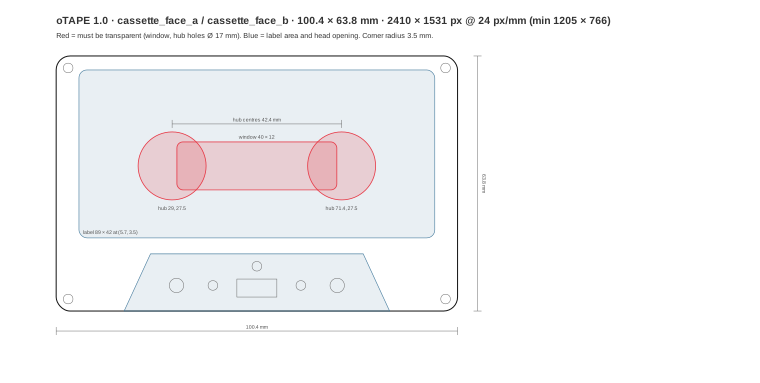
Coordinates in mm from the top-left of the face, cassette upright, head opening at the bottom:
| Feature | Geometry |
|---|---|
| Outline | 100.4 × 63.8, corner radius 3.5 |
| Window (transparent) | x 30.2–70.2, y 21.5–33.5 (40.0 × 12.0), corner radius 1.5 |
| Hub centres | (29.0, 27.5) and (71.4, 27.5), 42.4 apart |
| Hub holes (transparent) | Ø 17.0 around each hub centre |
| Visible drive hub | Ø 12.0, drawn by the player |
| Label position | x 5.7, y 3.5 (89.0 × 42.0) |
| Head opening | Trapezoid (17.0, 63.8) – (23.6, 49.5) – (76.8, 49.5) – (83.4, 63.8) |
| Screws | Ø 2.4 at (3.0, 3.0), (97.4, 3.0), (3.0, 60.8), (97.4, 60.8), (50.2, 52.6) |
Side B's face has the same layout. The cassette is turned over, not mirrored.
§12.5 Label
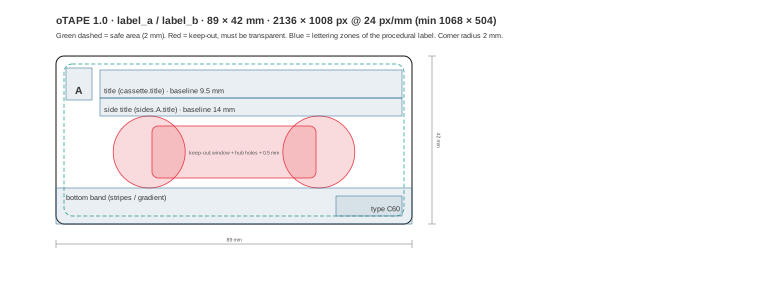
- Size 89.0 × 42.0 mm, corner radius 2.0. It sits at (5.7, 3.5) on the face.
- Keep-out zone, which MUST be transparent: the window and both hub holes, grown by 0.5 mm. In label coordinates that is the window rectangle x 24.0–65.0, y 17.5–30.5, plus circles of Ø 18.0 around (23.3, 24.0) and (65.7, 24.0). Players cut this zone out whatever the image contains.
- Safe area: 2.0 mm inset. Keep lettering inside it.
- Lettering zones of the procedural label: §10.4.
§12.6 J-card panels
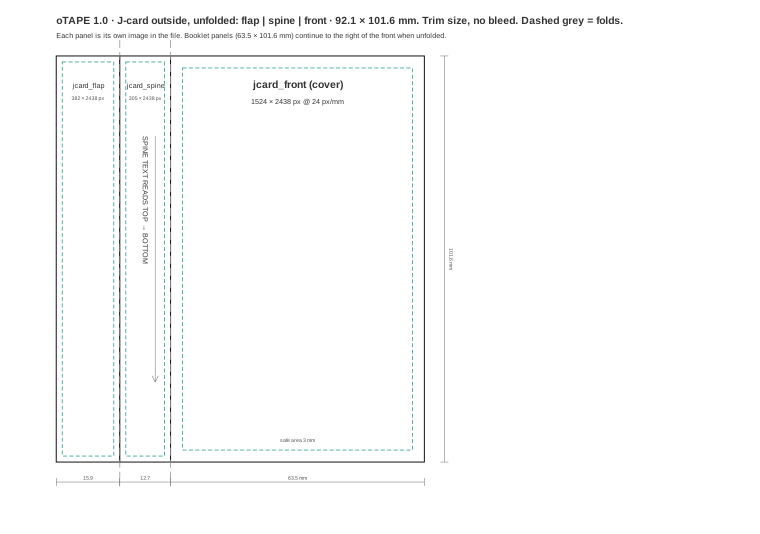
Unfolded outside, left to right: flap 15.9 | spine 12.7 | front 63.5, all 101.6 mm high, 92.1 mm wide in total. Each panel is a separate image.
- Safe area: 3.0 mm on the front, 1.5 mm on the spine and flap.
- Spine and flap images are stored upright (portrait) with their text reading top to bottom (§11.3).
§12.7 Booklet and documents
"booklet": {
  "panels": ["artwork/booklet-01.png", "artwork/booklet-02.png"],
  "html": "docs/booklet.html",
  "notes": "docs/notes.md"
}panels: fold-out panels in reading order, each 63.5 × 101.6 mm (1524 × 2438 px). They unfold to the right of the front cover. Panel 1 is usually the inside of the cover.html: an optional HTML booklet for liner notes, photos and lyrics. It MUST follow the oTAPE booklet profile:- HTML5, UTF-8, a single file;
- no scripts: no
<script>, no event-handler attributes, nojavascript:URLs; - no forms,
<iframe>,<object>or<embed>; - only relative URLs to entries in the same archive (images, CSS), with no network access;
- designed for a portrait page of 63.5 mm × 101.6 mm, scrolling vertically.
Readers that display it MUST do so in a sandbox with scripts and network disabled. Readers MAY ignore it.
notes: longer notes as CommonMark Markdown.
If both panels and html exist, the panels are the canonical printed look and the HTML is an alternate reading view.
§12.8 Templates
SVG templates at 1:1 millimetre scale are in templates/: cassette-face.svg, label.svg, jcard-outside.svg and booklet-panel.svg. They import into vector tools at real size.
Every dimension in this section is also published as JSON in geometry/otape-geometry-1.0.json, for implementations that draw cassettes. The templates are generated from that file by tools/make_templates.py. If the JSON and this text ever disagree, this text is normative.
§13. History
history records the cassette's life as a collector's object. It is optional, and readers MUST NOT need it to play the cassette.
§13.1 Event object
| Key | Type | Req. | Description |
|---|---|---|---|
type | string | yes | §13.2 |
timestamp | string | yes | RFC 3339 |
app | string | no | Application name and version |
side | "A" / "B" | per type | |
| other | per type |
Events are in chronological order, and writers append to the end.
§13.2 Event types
type | Extra fields | Meaning |
|---|---|---|
created | none | The blank cassette came into being |
recorded | side, start_frame, end_frame, source, source_format | One recording pass |
write_protect_changed | side, state | The record tab changed (§8) |
erased | side | A side was bulk-erased (recorded_frames reset to 0) |
dubbed | source_cassette_id | This cassette was made by copying another one |
edited | what (string) | Metadata or artwork changed (optional, may be coalesced) |
source is one of file, line, radio, microphone, dub or generated. source_format is free text, e.g. mp3.
Readers MUST ignore event types they don't know, and writers MUST keep them (§15.2).
§14. Medium state and local state
| Belongs to the cassette (in the file) | Belongs to the player (not in the file) |
|---|---|
| audio, recorded length, markers | last head position and side |
| write protection | favourites, ratings, play counts |
| appearance, artwork, J-card, booklet | library, shelves, tags |
| identity, metadata, history | counter resets, volume |
Playing a cassette MUST NOT modify the file. Players SHOULD remember the side and head position per cassette.id, so a cassette put back into the deck resumes where it was, the way a real tape stays wound where you left it.
§15. Versioning and extensibility
§15.1 Versions
format_version is "MAJOR.MINOR".
- Minor versions only add optional fields, values or slots. A 1.x reader MUST read every 1.y file, ignoring what it doesn't understand.
- Major versions may change meaning. Readers MUST refuse a major version they don't support, and SHOULD say that the file needs a newer application.
- Writers MUST write the lowest version whose features they use, and MUST NOT claim a version they don't implement.
§15.2 Preservation
Unknown fields, unknown slots, unknown history events and unknown archive entries MUST be ignored by readers. Writers modifying an existing cassette MUST preserve them unchanged, unless the user removes them explicitly. This lets cassettes pass between applications without losing anything.
§15.3 Extensions
Implementation-specific data goes in extensions, keyed by a reverse-DNS identifier the implementer controls:
"extensions": { "org.example.player": { "shelf_position": 12 } }Files go under extras/<identifier>/…. Extensions MUST NOT change the meaning of standard fields.
§16. Conformance
§16.1 Reader (validator)
A conforming reader:
- opens the ZIP container (§3), checking paths (§3.3) and limits (§3.5);
- checks
format=oTAPEand that it supports the major version; - validates the required fields:
cassette.id,typewith matchingside_length_seconds,created_at, and both sides with a validwrite_protect; - for each side with audio, checks that
fileexists and thatrecorded_frames≤ the side length in frames; - rejects the file if any of the above fails, naming the reason.
The JSON Schema schema/otape-manifest-1.0.schema.json covers the structural part. Rules spanning several fields, such as recorded_frames against the side length or entries existing in the archive, need code. tools/otape_validate.py implements all of them, together with the artwork and container checks.
§16.2 Player
A conforming player is a reader that additionally:
- plays both sides from
aac-lcaudio with exact length (§7.3), treating blank tape as silence; - shows at least the title, type, side and position;
- draws the artwork it supports, falling back to
appearanceor a neutral cassette; - does not modify the file while playing (§14).
§16.3 Recorder
A conforming recorder is a player that additionally:
- records over a side in place and updates
recorded_frames(§9); - refuses to record on
brokensides and offers "cover with tape" (§8); - writes
mimetypefirst (§3.2),aac-lcaudio and a valid manifest; - preserves unknown data (§15.2).
§16.4 Editor
A conforming editor changes metadata, appearance, J-card or artwork without re-encoding audio, enforces artwork proportions (§12.1) and preserves unknown data.
§17. Security considerations
- Path traversal. Reject
.., absolute paths and backslashes (§3.3). Never extract outside a private directory. - Decompression bombs. Limit the total uncompressed size and the compression ratio. Stream large entries.
- Images. Enforce the pixel limits before decoding (§3.5).
- HTML booklets are untrusted content. Render them only in a sandbox with scripts and network disabled (§12.7).
- Privacy. History and metadata can contain names, places and dates. Applications SHOULD let users see and remove them before sharing a cassette.
- No DRM.
write_protectandidprovide no security and must not be relied on as such.
§18. Reference material
| Item | Location |
|---|---|
| JSON Schema | schema/otape-manifest-1.0.schema.json |
| Geometry (JSON) | geometry/otape-geometry-1.0.json |
| Example manifests | examples/manifests/. Files named invalid-* must be rejected by a conforming reader. |
| Example cassettes | examples/files/ |
| Artwork templates (SVG, mm) | templates/ |
| Validator | tools/otape_validate.py (Python 3, standard library; jsonschema optional) |
| Reference writer | tools/make_examples.py, a minimal writer that builds the example cassettes |
| Reference implementation | oTape Studio for macOS by Jan Osio. A full recorder and player whose test suite loads the example cassettes and checks its geometry against the JSON file. |
§Appendix A: Changes from the 1.0 draft
The first draft of this specification was reviewed against a working recorder. These inconsistencies were resolved for 1.0:
| # | Draft | 1.0 | Why |
|---|---|---|---|
| 1 | Both audio/side-a.m4a and side-b.m4a required | Audio is required only for a recorded side. A blank side has "audio": null. | A new cassette is blank. Storing encoded silence is wasteful and says nothing. |
| 2 | Per-side data spread over audio.side_a, write_protect.side_a, track_markers.side_a, with naming side_a_write_protect in another section | All per-side data in one object: sides.A, sides.B | One place per side and one naming scheme. Side keys are "A"/"B", as in history. |
| 3 | duration_seconds (float) as the length; marker time in seconds | Integer frames on one timeline_rate: recorded_frames, marker frame; seconds are informative | Floats can't place a recording or a silence exactly. Frames are exact. |
| 4 | Side capacity and recorded length mixed | cassette.side_length_seconds = capacity; sides.*.audio.recorded_frames = what was recorded | They are different things: a C60 side is 30 minutes even if 12 are recorded. |
| 5 | "Playback position is counted separately per side" | One tape: position on B = L − position on A (§5.4); stored locally, not in the file | A real tape has one position. Flipping at the end of A puts you at the start of B. |
| 6 | tape_override_applied event, separate from the state | Only write_protect_changed with state | Taping over is a state change. One event type covers all three transitions. |
| 7 | broken → intact not excluded | A broken tab can never become intact (§8.2) | It is physically impossible. |
| 8 | case-front.png and booklet-cover.png | jcard_front is the cover. Booklet panels are the fold-out. | Both draft files described the same panel. |
| 9 | case-back.png (no defined meaning) | Removed. The flap is jcard_flap, and inner panels are booklet panels. | A standard case has no printed back. The visible parts are the front, spine and flap. |
| 10 | Artwork without sizes | Physical sizes, aspect ratios, px/mm, keep-out and safe areas, layering (§12) | Without fixed proportions, artwork can't be exchanged between applications. |
| 11 | booklet.mode (panels or html) | No mode. Panels are canonical, and HTML is an optional alternate view. | Both can coexist, and a mode field adds a way to be inconsistent. |
| 12 | specification URL in every manifest | Not required. The version identifies the specification. | The URL is not stable yet, and files must not depend on a website. |
| 13 | recorded_from per cassette (mp3, radio, mic, aux, dub) | source per recorded event (file, line, radio, microphone, dub, generated) and source_format (e.g. mp3) | One cassette can mix sources, and mp3 is a file format, not a source. |
| 14 | format_version "uses semver" | MAJOR.MINOR with explicit rules (§15) | A file format has no patch level. Compatibility rules are stated precisely. |
| 15 | MIME application/vnd.otape.cassette only proposed | Plus a mimetype first entry (§3.2) | Identifies a file by its bytes without unzipping. |
| 16 | Procedural look unspecified (images only) | appearance and jcard with drawing rules and font roles | A cassette must look like itself even without images. |
| 17 | extras/waveform-side-a.json with no format | extras/<reverse-dns>/… plus extensions | Lets implementations add data without colliding. |
§Appendix B: Geometry reference
All values below, and those of §12, are also in geometry/otape-geometry-1.0.json.
§B.1 Summary of physical sizes (mm)
| Object | Width | Height | Depth |
|---|---|---|---|
| Cassette shell | 100.4 | 63.8 | 12.0 |
| Label | 89.0 | 42.0 | n/a |
| J-card front | 63.5 | 101.6 | n/a |
| J-card spine | 12.7 | 101.6 | n/a |
| J-card flap | 15.9 | 101.6 | n/a |
| J-card unfolded (outside) | 92.1 | 101.6 | n/a |
| Booklet panel | 63.5 | 101.6 | n/a |
| Case | 109.0 | 70.0 | 17.0 |
§B.2 Pixel sizes
| Object | 24 px/mm (recommended) | 12 px/mm (minimum) |
|---|---|---|
| Cassette face | 2410 × 1531 | 1205 × 766 |
| Label | 2136 × 1008 | 1068 × 504 |
| J-card front / booklet panel | 1524 × 2438 | 762 × 1219 |
| J-card spine | 305 × 2438 | 152 × 1219 |
| J-card flap | 382 × 2438 | 191 × 1219 |
§B.3 Reels and tape packs
For realistic reels, players MAY use this model (all lengths in cm):
- tape speed v = 4.76 cm/s; tape length on a side ℓ = v ×
side_length_seconds; - empty reel (hub) radius r₀ = 1.1 cm;
- tape thickness t: 18 µm for sides up to 35 minutes (C46, C60), 12 µm up to 50 minutes (C90), 9 µm above that (C120);
- with x the tape already wound onto the take-up reel (x = v × head seconds):
- take-up pack radius r = √(r₀*² + *x·t/π)
- supply pack radius R = √(r₀*² + (*ℓ − x)·t/π)
- revolutions of the take-up reel since the start of the side = (r − r₀) / t, which also drives a realistic three-digit mechanical counter.
On a C60 this gives a full pack radius of about 2.47 cm. The take-up reel turns fast at first and slows down as it fills.
§Appendix C: Reading an oTAPE file step by step
open ZIP
  └ if first entry is "mimetype": expect "application/vnd.otape.cassette" (informative)
read manifest.json  → JSON object (≤ 1 MiB)
  ├ format == "oTAPE"                    else: not an oTAPE file
  ├ major(format_version) == 1           else: needs newer app
  ├ cassette.id is UUID
  ├ (type, side_length_seconds) valid    (§5.1)
  ├ rate = cassette.timeline_rate ?? 44100
  └ for side in A, B:
       write_protect ∈ {intact, broken, taped_over}
       if audio != null and audio.recorded_frames > 0:
           path safe and present in archive
           recorded_frames ≤ side_length_seconds × rate
           decode, resample to rate if needed, trim/pad to recorded_frames
       else: side is blank tape
draw: appearance + artwork (§10, §12), jcard (§11)
restore local head position for cassette.id (§14)